
 JioHotstar
 watch party with video chat
Watch JioHotstar together with friends online. Flickcall syncs the show on every screen and adds live video chat and text chat beside the player.
Free to use · Runs in Chrome on a laptop or desktop
Koffee With Karan. Pause for the gossip; both mics come on.
sound familiar?
Watching JioHotstar long distance? We know this chat by heart.
Counting down over text. Somebody always ends up a few seconds ahead. You hear the laugh before you see the joke.
With Flickcall there is no countdown. One play button runs both laptops, and a pause on one side is a pause on both.
Ria, Sam, you
ok press play on 3
3… 2… 1… ▶️
wait I'm like 5 seconds ahead 😭
why are you laughing, nothing happened yet
PAUSE. pause pause. bathroom
never again ♡Watch JioHotstar together online, miles apart.
- JioHotstar in sync, even across episodesPlay, pause or skip, and everyone's player follows. When the host starts the next episode, the whole party moves with it.
- See reactions with video chatA video call and chat sit beside the show, so you catch every laugh and gasp. Camera off or mic only works too.
- Start a party in 10 secondsAll it takes is one click. No setup, no screen sharing, just a link to send.
- Smart Mic for a natural conversation flowPress pause and your mic turns on by itself, so you can just talk. Press play and it mutes again. That's Smart Mic, on from the start.
How to watch JioHotstar with friends
- Add Flickcall to ChromeFrom the Chrome Web Store. Pin it to the toolbar.
- Play an episode on JioHotstarOpen a show or a match on hotstar.com and press play.
- Start the watch partyClick the Flickcall logo on the video. It shows for a few seconds after play.
- Send the party linkYour friends click it and land on the same episode, at the same spot.
10 shows to watch together on JioHotstar
Hand-picked for your next JioHotstar watch party. Open one, start the party, send the link.
-
 Open on JioHotstar ↗
Your pick
Koffee With Karan
Gossip hour, mics on at pause.
-
 Open on JioHotstar ↗
Your pick
Modern Family
Tell me your family does this.
-
 Open on JioHotstar ↗
Your pick
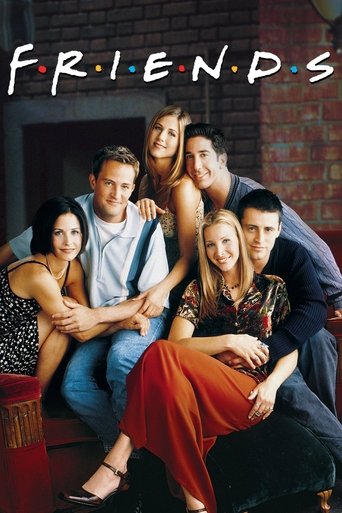
Friends
You know every line. Say them together.
-
 Open on JioHotstar ↗
Your pick
How I Met Your Mother
Nine seasons, one long love story.
-
 Open on JioHotstar ↗
Your pick
Game of Thrones
Pause. Did that really just happen?
-
 Open on JioHotstar ↗
Your pick
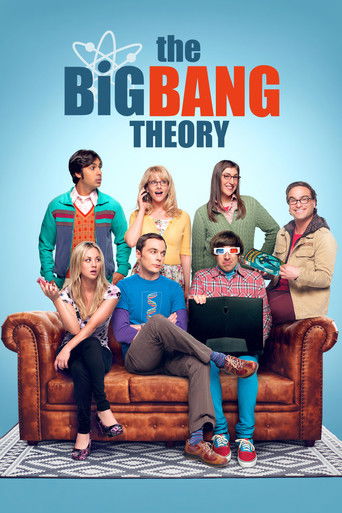
The Big Bang Theory
Sign Sheldon's roommate agreement? Discuss.
-
 Open on JioHotstar ↗
Your pick
Grey's Anatomy
We said we wouldn't cry again.
-
 Open on JioHotstar ↗
Your pick
Brooklyn Nine-Nine
Twenty minutes, zero stress.
-
 Open on JioHotstar ↗
Your pick
Roadies - Rebirth
Pick a side, shout about it.
-
 Open on JioHotstar ↗
Your pick
Loki
Pause. Explain that timeline to me.
What you need for a JioHotstar watch party
- Each of you signed in to JioHotstar on your own laptop, with access to the episode.
- Chrome on a laptop or desktop works best. Other Chrome-based browsers may work too. Phones can't run Flickcall.
- The Flickcall extension, free to add. A free Flickcall account turns on video chat.
JioHotstar watch party FAQs
Does JioHotstar have a watch party feature?
JioHotstar's web player has no watch party button. Flickcall adds one: a free JioHotstar watch party extension for Chrome that keeps the show in sync for everyone in the party, with video chat beside the player.
Can we watch JioHotstar together on Discord?
Screen sharing JioHotstar on Discord often shows your friends a black screen. With Flickcall nobody shares a screen: each of you plays JioHotstar on your own laptop, and Flickcall keeps the players in sync.
Does everyone need their own JioHotstar login?
Each person watches on their own laptop, signed in to JioHotstar with access to the episode. One account on two laptops depends on your plan's screen limit.
What happens when an ad plays for one of us?
Each of you sees your own ads. While an ad plays on one laptop, Flickcall holds the other player, so nobody misses a scene.
Does a live match work?
Yes. On a live stream Flickcall never seeks anyone. If one of you jumps around, it brings everyone back to live together.
Can we watch JioHotstar together long distance?
Yes, from different cities or countries, as long as JioHotstar streams the show where each of you is. JioHotstar streams in only some countries and its catalogue differs by country, so check that both of you can play the same episode.
Can I join a JioHotstar watch party on my phone?
No. Flickcall runs in Chrome on a laptop or desktop. Phones aren't supported.
Is Flickcall free?
Yes. Core features like video playback sync and chat are free on every supported platform. Video and voice chat come with a free weekly allowance. Paid plans unlock unlimited video chat, and only one person in the party needs one.
Watch parties on more streaming platforms














one thing first
Add Flickcall, then open
Flickcall is a free Chrome extension. Add it, come back, and every show here opens with a party button on the video.
Add Flickcall to Chrome, free Just open it on JioHotstar ↗Flickcall runs on a laptop, in the Chrome browser
(or any browser that supports Chrome extensions)
Pick a way to get it there.
Open the Chrome Web Store ↗